
Mario Paint
Draw, animate and compose — creative freedom with the SNES Mouse
Overview
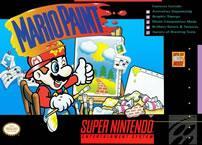
Mario Paint is an art tool game bundled with the SNES Mouse and Mouse Pad, released in 1992 for the Super Famicom and SNES. Developed by Nintendo R&D1 and Intelligent Systems, it lets players paint freehand artwork, build custom stamps pixel-by-pixel, compose original music, and create frame-by-frame animations — all within a cheerful Mario-themed interface. It was one of the very few SNES games designed specifically around the mouse peripheral.
The game has no objectives or challenges — pick up the mouse, pick a tool, and make something. Despite this open-ended premise, it became one of the most beloved SNES titles. The music mode in particular spawned a community of fan composers that still exists today, and the game directly inspired Mario & Wario, WarioWare: D.I.Y., and Super Mario Maker. Its US commercial tagline — “I didn’t dream it, I made it happen!” — captures the spirit perfectly.

Artist Mario
Music Mario

Conductor Mario

Composer Mario
The title screen — a game within a game
Before you even pick up a brush, the title screen rewards curiosity. Every letter of “MARIO PAINT” responds differently when clicked — and players have been clicking them for over 30 years:
- M — Shrinks Mario down. Click again and he pops back to full size, like a Mushroom in reverse.
- A (first) — The letter falls off the screen and bounces back. If Mario happens to be underneath, he gets knocked off with it.
- R — An eye appears on the R, it makes a baby noise, then crawls off and back. Playing that sound backwards sounds like “Nintendo”.
- I (first) — Inverts all black and white colours on screen including Mario’s. Music becomes warped and distorted.
- O — Grows a fuse and explodes like a bomb. After the explosion, Kazumi Totaka’s famous hidden song plays — the same one that appears in Yoshi’s Safari, Luigi’s Mansion, Animal Crossing, and dozens of other Nintendo games. A true Easter egg classic.
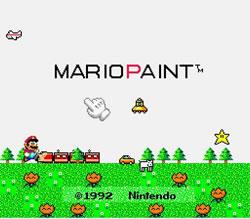
- P — The whole title screen transforms into a green field full of trees, cars, animals, UFOs, and shooting stars. Every object makes a unique sound when clicked. Music slows to a mellow version of BGM 1.
- A (second) — Yoshi sprints across the screen with drum sound effects while he’s visible.
- I (second) — All on-screen text shakes, music distorts.
- N — The developer credits scroll while extra background instruments not normally audible join the music.
- T — Drawing switches to a thick rainbow crayon texture. Title music slows but keeps playing.
There’s also a hidden developer mode: start the game while holding the right mouse button during a specific developer credit in the N sequence. This enables right-click undo, four extra stamp rotation options, and a quick-reset function via the second controller port.
Art mode

The blank canvas — ready for something brilliant, or at least enthusiastically colourful.
The open canvas is the heart of the game. Here’s what the Art Mode toolbar gives you:
- Pencils — Three sizes of freehand drawing tools for fine lines to thick strokes
- Straight line tool — Draw perfectly straight lines at any angle, crucial for geometric designs
- Paint/fill — Flood-fill any enclosed area with a colour, texture or stamp sprite
- Text — Add numbers and letters from a built-in text menu
- Stamps — Pre-loaded sprites from Super Mario World plus trees, houses, everyday objects — and any custom stamps you’ve made yourself
- Erase — A standard eraser, plus several amusing screen-wipe animations that dramatically clear the whole canvas
- Undodog — Click Undodog’s icon to undo your last action. He’s always watching. Always ready.
Cycle through all colours and stamps by clicking Mr. Crayon. The palette covers 14 colour sets of 14 colours each — see the full palette table below. You can also completely fill the screen with a colour, texture or sprite in one click, and save one canvas to the cartridge’s built-in battery-backed SRAM.
The complete colour palette
Mario Paint’s palette is organised into 14 colour sets, each containing 14 colours. You cycle through them by clicking the Mr. Crayon icon — each set has its own distinctly coloured crayon version. These are the exact official in-game colour swatches from the game data:
| Set | 1 | 2 | 3 | 4 | 5 | 6 | 7 | 8 | 9 | 10 | 11 | 12 | 13 | 14 | Crayon |
|---|---|---|---|---|---|---|---|---|---|---|---|---|---|---|---|
| 1 |  |
 |
 |
 |
 |
 |
 |
 |
 |
 |
 |
 |
 |
 |
 |
| 2 |  |
 |
 |
 |
 |
 |
 |
 |
 |
 |
 |
 |
 |
 |
 |
| 3 |  |
 |
 |
 |
 |
 |
 |
 |
 |
 |
 |
 |
 |
 |
 |
| 4 |  |
 |
 |
 |
 |
 |
 |
 |
 |
 |
 |
 |
 |
 |
 |
| 5 |  |
 |
 |
 |
 |
 |
 |
 |
 |
 |
 |
 |
 |
 |
 |
| 6 |  |
 |
 |
 |
 |
 |
 |
 |
 |
 |
 |
 |
 |
 |
 |
A 15th slot in the palette is reserved for custom stamps created in Stamp Mode — cycling to it shows your own creations rather than preset colours.
Stamp mode

Stamp Mode — the pixel art editor before pixel art editors were cool.
Stamp mode is Mario Paint’s built-in pixel art editor. The game ships with a library of pre-made stamps, but Stamp mode lets you design up to 15 of your own custom sprites from scratch.
You’re given a grid and can colour each pixel individually using the full palette. The resulting stamp can then be used like any other sprite in Art Mode — plonked into paintings, filled across areas, or used as a custom pen tip. If you create a single-pixel-wide stamp, it acts as an ultra-fine pen thinner than any of the standard pencil tools. Custom stamps are saved to the cartridge’s battery backup alongside your artwork.
Music mode

Music Mode: a five-line stave, 16 instrument icons, and limitless patience required.
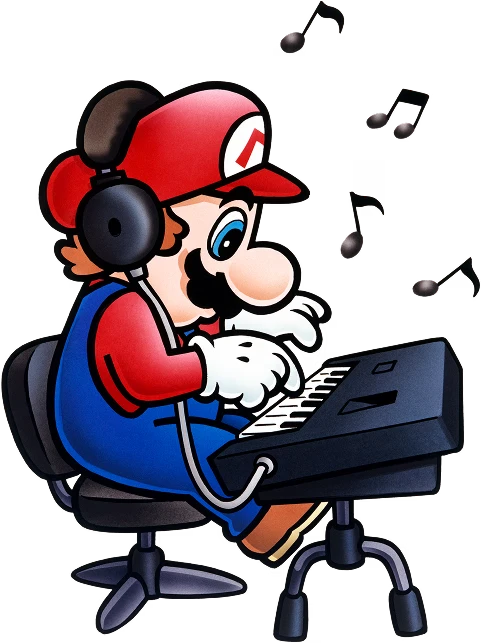
Music mode lets players compose their own pieces using a set of instrument icons placed along a treble clef staff. Notes range from B3 to G5, up to three instruments can share the same beat, and compositions can be written in 3/4 or 4/4 time across up to 24 measures. Tempo is adjustable from around 40 to 480 beats per minute, and pieces can loop. The game ships with three default compositions:
- An arrangement of the Ground Themes from both Super Mario World and Super Mario Bros., composed by Koji Kondo
- An arrangement of “Twinkle, Twinkle, Little Star”
- An arrangement of the song used in the original Japanese TV commercial for Mario Paint
The instruments: Each instrument icon represents a real sound. Here’s the full list of all 16:
Compositions made in Music mode can be used to accompany animations in Animation Land. Undodog also appears here to undo note placements.
Animation Land

Animation Land — frame-by-frame creation that predated most consumer animation tools.
Animation mode lets players create looping frame-by-frame animations with a set frame limit. Frames are drawn using the same tools as Art Mode, and the finished animation plays back on loop on top of whatever background canvas you’ve set in Art Mode. Optionally, a composition from Music Mode can play alongside the animation. The result is a mini cartoon — entirely of your own making.
Gnat Attack — the hidden mini-game

Gnat Attack — Mario vs. the gnats. Mario has a flyswatter. The gnats are not impressed.
Gnat Attack is the secret bonus game hidden inside Mario Paint, accessed by clicking the fly that buzzes around the title screen. Using the SNES Mouse as a fly swatter, the player must swat waves of fly-like enemies — regular flies, big flies, fly bombs, fly children and fly parents — before they overwhelm the screen. Completing stages brings Mario characters walking across in celebration.
The mini-game has a proper boss: King Watinga, who appeared in later stages. Gnat Attack became one of the most fondly remembered parts of Mario Paint, and its legacy runs long — the fly swatter concept appeared in WarioWare, Inc.: Mega Microgame$!, WarioWare: Touched!, Game & Wario, and was revived directly in Super Mario Maker alongside other Mario Paint callbacks.
Other features & options
- BGM Setting — Choose one of three background songs to accompany your drawing sessions, or turn music off entirely. If you turn it off completely, Undodog sneezes occasionally in the silence — a small, perfect detail.
- Mouse Speed — Choose between Slow, Medium and Fast to suit your drawing style.
- Save / Load / Coloring Book — The game saves one canvas to battery-backed SRAM. Save and Load are accompanied by an animation of a robot processing data with techno music. Coloring Book provides four default black-and-white canvases ready to colour in.
- Frame mode — Removes the upper and lower tool icons and places a black border around the canvas, creating a clean “gallery presentation” view of your work.
- Quick Start — Hold A+B on a controller in the second player port to skip straight into the game from the title screen.
- View Save Data — Hold A+B+Select on a second-player controller on the title screen to instantly view your most recently saved image, animation, and song. If nothing is saved, it displays “NO SAVE DATA” with appropriate dignity.
- DATA OVER FLOW — If you manage to fill both the Art and Animation canvases so completely that the resulting work exceeds the cartridge’s 32KB SRAM, the save will fail with a special error animation showing smoke billowing from the sides of the robot’s head. The spray tool with every colour is one reliable way to trigger it.
The Nintendo Power Mario Paint Contest

The sixteen winning entries as shown in Nintendo Power Vol. 47, April 1993. Grand prize went to Stephen D. Miller from Tucson, Arizona.
In Volume 41 of Nintendo Power (October 1992), Nintendo ran the Mario Paint Contest — one of the most imaginative reader competitions the magazine ever hosted. To enter, participants created an art piece using Mario Paint, recorded it onto a VHS tape, and posted the tape to Nintendo Power’s PO box. The contest closed on 1 December 1992.
The “most creative entries” from sixteen participants were promised publication in a future issue. The prizes: the grand prize winner received five SNES game paks, and fifteen runner-ups each received one.
In Volume 47 (April 1993), the sixteen winners were revealed. The grand prize went to Stephen D. Miller from Tucson, Arizona. The collage of all sixteen winning entries is shown above — a genuine time capsule of early 90s home creativity, made possible by a game that handed players the tools and stepped back.
“To enter, participants created an art piece using Mario Paint, recorded it onto a video tape, and sent the tape to Nintendo Power’s PO box.” — an absolutely wonderful contest format that could only exist in 1992.
There’s a charming postscript to the contest: the Satellaview version of the game — Mario Paint Yūshō Naizō Ban — contains a hidden picture that can be found using the Save/Load menu. The hidden image is “Dreaming of the Moon” (「月を夢見て」) by contest participant Mizota Hiroko (溝田 祐子), quietly preserved inside a Japan-exclusive re-release of the game.
Reception
Mario Paint received glowing reviews across the board. Nintendo Power gave enthusiastic write-ups from both of their reviewers: George called it “so well made that I think anyone who has even a remote interest in creating drawings, animation or music will really like it”, while Rob declared it “a blast for people of any age.”
Electronic Gaming Monthly’s Ed Semrad scored it 8/10, praising how “this device simulates the feel of an artistic tool and allows anyone the ability to design their own masterpieces.” GamePro’s N. Somniac gave perfect 5/5 scores for graphics and controls, calling it “the perfect introduction for kids to computers” while noting it had “enough interaction, complexity, and options to keep older gamers just as interested. A nice change of pace from other SNES fare. Mario Paint’s a work of art!”
Nintendo Power later rated it 162nd best game ever made on a Nintendo system in their Top 200 Games list — respectable company for a creative tool rather than a traditional game.
Legacy & influence
Mario Paint’s shadow over gaming and internet culture is longer than most people realise:
- WarioWare: D.I.Y. — Designer Masahito Hatakeyama explicitly cited Mario Paint as the inspiration for D.I.Y.’s drawing and music creation tools. Several team members said Mario Paint was the game that taught them the joy of game development.
- Mario Paint Composer — A beloved fan-made Windows program that recreated the Music Mode with longer song length, more notes per beat, more sounds and the ability to save and share compositions. It became a viral phenomenon in the mid-2000s before YouTube existed as the dominant format.
- Homestar Runner — The very first episode of the Homestar Runner web series was animated entirely using Mario Paint. A later short and part of the 20th anniversary special were also made in Mario Paint.
- Super Mario Maker — Directly revived Gnat Attack, Undodog, the interactive title screen concept, and the Baby Face sound effect. The save-and-load robot animation theme is reused as the Coursebot music.
- Super Smash Bros. for Wii U — An arranged medley of Mario Paint songs plays on the Miiverse stage.
- Super Mario Odyssey — Multiple Crazy Cap costumes are based on Mario’s appearances in Mario Paint promotional artwork.
- Hirokazu Tanaka — One of Mario Paint’s sound staff. He later worked on EarthBound, and some of Mario Paint’s sound effects and instruments appear in both games.
- The game was re-released on Nintendo Switch Online’s SNES library on July 29, 2025, with full USB mouse support on Switch and Joy-Con 2 support on Switch 2.
Satellawave versions

The hidden “Dreaming of the Moon” picture by Mizota Hiroko, tucked inside the Satellawave re-release.
Mario Paint was re-released in two minor variations on the Japanese Satellawave service:
- Mario Paint BS Ban (マリオペイントBS版) — Added joypad/controller support, removing the mouse requirement for the first time.
- Mario Paint Yūshō Naizō Ban (マリオペイント優勝内蔵版) — All of the above, plus a hidden picture accessible via the Save/Load menu: “Dreaming of the Moon” (「月を夢見て」) by Mizota Hiroko, one of the Nintendo Power contest winners. A lovely way to permanently preserve a fan’s creation inside the game itself.
References in later games
- Super Mario Maker — Revived Gnat Attack as a minigame, Undodog appears in loading screens, the Baby Face sound effect returns, and the Coursebot theme uses the Save & Load music
- Super Mario Maker 2 — The pig from Music Mode appears as a sound effect; Baby Face sound returns
- WarioWare: D.I.Y. — Multiple direct references including the microgame maker interface, the Baby Face as a stamp, and the Kung-Fu Men instrument demo tune which quotes the Mario Paint “Opening 2” theme
- WarioWare, Inc.: Mega Microgame$! — The Mario Paint Fly Swatter microgame and minigame are directly based on Gnat Attack
- WarioWare: Twisted!, Touched!, Gold, Get It Together!, Move It! — Various appearances of the Baby Face, Udetate, and Gnat Attack-based microgames
- Game & Wario — Super Fly Swatter is based on Gnat Attack; Baby Faces appear in place of regular flies
- Super Smash Bros. for Wii U — Mario Paint song medley plays on the Miiverse stage
- Super Mario Odyssey — Crazy Cap costumes reference Mario’s appearances in Mario Paint promotional artwork
- Mario Artist: Polygon Studio (N64DD) — The Mario Paint exercise cartoon is recreated; the two stick figures appear as NPCs
- Mario Kart World — Arrangements of “Drawing Board 1” and “Gnat Attack: Level 1” play during Free Roam and VS Race routes
Release information
Trivia & interesting facts
- Bundled with the SNES Mouse and Mouse Pad — for most players this was their first experience of mouse computing
- One of the very few SNES games designed primarily for mouse input
- Developed by Nintendo R&D1 and Intelligent Systems — a collaboration between two of Nintendo’s most creative internal teams
- The title screen easter eggs for all 10 letters of “MARIO PAINT” were discovered and documented by players over many years
- Clicking the R on the title screen plays a sound that, when reversed and slowed, says “Nintendo”
- Clicking O plays Kazumi Totaka’s famous hidden song — a melody Totaka has hidden in almost every game he’s worked on since
- The Gnat Attack mini-game is accessible by clicking the fly on the title screen — many players never found it
- If music is turned off in BGM settings, Undodog occasionally sneezes in the background
- The game can save to 32KB of battery-backed SRAM — filling it triggers a special “DATA OVER FLOW” error with a smoking robot animation
- Three default compositions ship with the game, including a Koji Kondo arrangement combining the SMB and SMW Ground Themes
- The Nintendo Power Mario Paint Contest (NP Vol. 41, 1992) required entrants to record their art on a VHS tape and post it in
- Grand prize: five SNES game paks. Given to Stephen D. Miller from Tucson, Arizona
- The Satellawave Yūshō Naizō Ban version hides a contest winner’s artwork (“Dreaming of the Moon”) in the Save/Load menu
- Homestar Runner’s very first episode was animated in Mario Paint
- Mario Paint Composer — a fan-made Windows recreation of Music Mode — became a viral hit in the mid-2000s
- WarioWare: D.I.Y. was directly inspired by Mario Paint’s drawing and music creation tools
- Re-released on Nintendo Switch Online on 29 July 2025 with USB mouse and Joy-Con 2 support
- A planned direct sequel — Mario Paint 64 — was in development for the N64DD but was reworked into Mario Artist: Paint Studio
- Nintendo Power rated it 162nd best Nintendo game of all time in their Top 200 list